FOR HVAC CREWS AND SOLO TECHS
HVAC Software With Scheduling Built for Small Crews
Team US$49/mo flat for up to 10. Solo US$14.99/mo. Try Team free for 14 days, then Starter is free for one person. No card needed to start.
Handro is HVAC software for scheduling, quotes and invoicing, and the whole crew runs on one flat price: Team is US$49 a month for up to 10 people, with no per-user pricing. Every tech's day sits on one schedule, from the tune-up call to the emergency no-heat visit, and an approved quote becomes the job and the invoice from your phone. Starter is free for one person and unlimited jobs.

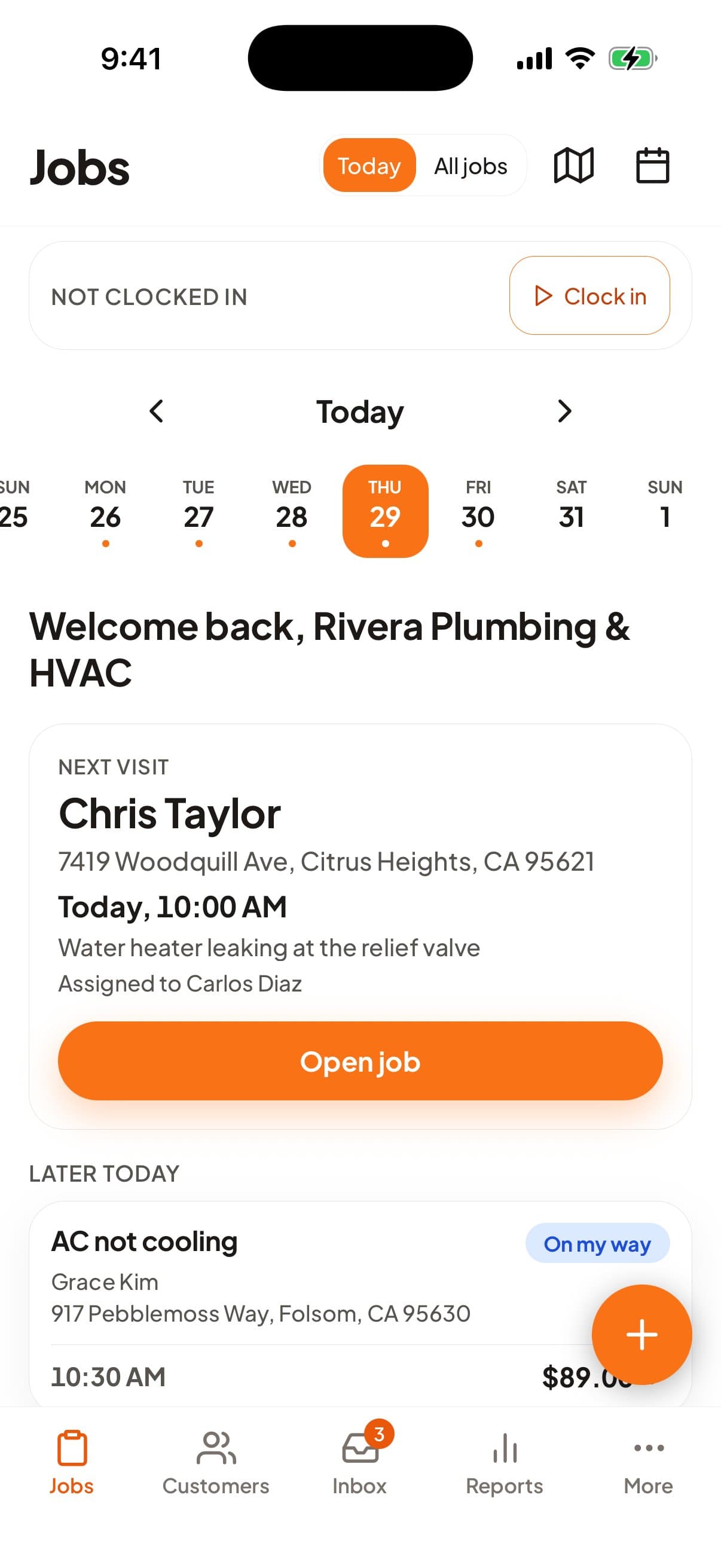
One schedule for the whole crew
Handro's Today view shows every tech's day in one place: what's booked, what's in progress and what's still open. Assign a job to whichever tech is free, and everyone sees the change the moment you make it. Solo operators get the same view scaled down to their own day.
What HVAC scheduling software needs to handle
HVAC work means juggling tune-ups, no-heat emergencies and installs on the same day, often for different techs. The schedule needs to show who's free and what's already been quoted. Handro's Today view covers both, so you can assign a job from the schedule instead of calling around the shop.
Recurring maintenance without rebooking it
Seasonal tune-ups repeat on their own once you set the cadence, so a spring and fall visit isn't typed in twice. Recurring jobs create the next visit automatically, and anything already worked, messaged or invoiced stays untouched. Turn on autopay and each finished tune-up charges the card the customer saved, up to the series price. If a charge doesn’t go through, you’re told. For help setting that cadence, see our guide How to Build an HVAC Maintenance Schedule That Keeps Revenue Coming.
A no-heat call, start to finish
A no-heat call can go from booked to quoted to invoiced without switching tools. You check the schedule, drive to the address, and send a Good, Better and Best estimate for the repair. The customer approves and signs on their phone, so the approved job is ready to schedule before you've opened your toolbag. Once it's done, the invoice pulls from the same job record and can be paid by card, cash, check or Venmo.
What it costs for a small HVAC crew
Team is US$49 a month flat for up to 10 people, with every feature on every paid plan. Jobber Connect is US$199 a month for 5 people and Housecall Pro Essentials is US$189, billed monthly (their list prices, checked November 12, 2026). Solo is US$14.99 a month for one person. Try Team free for 14 days, then Starter stays free: one person, unlimited jobs. No card needed to start.
Runs on the truck and at the office
Handro is a website and native iOS and Android apps, so techs work the field while the owner runs the office. There's nothing to install per truck, and the data stays the same on both. A tech who's mid-job on the app sees the identical schedule the owner sees at a desk.
What to check before you switch off a paper board or spreadsheet
A paper schedule or whiteboard works until a tech is out sick or a job runs long and everything after it slides. Check that any tool you move to can reassign a job without a phone call to every tech. You can export your jobs and customers at any time, so trying Handro doesn't mean losing your records if it's not a fit. Starter is free, enough to see whether the schedule fits your crew.
IN THE APP
The real screens, not a mock-up.
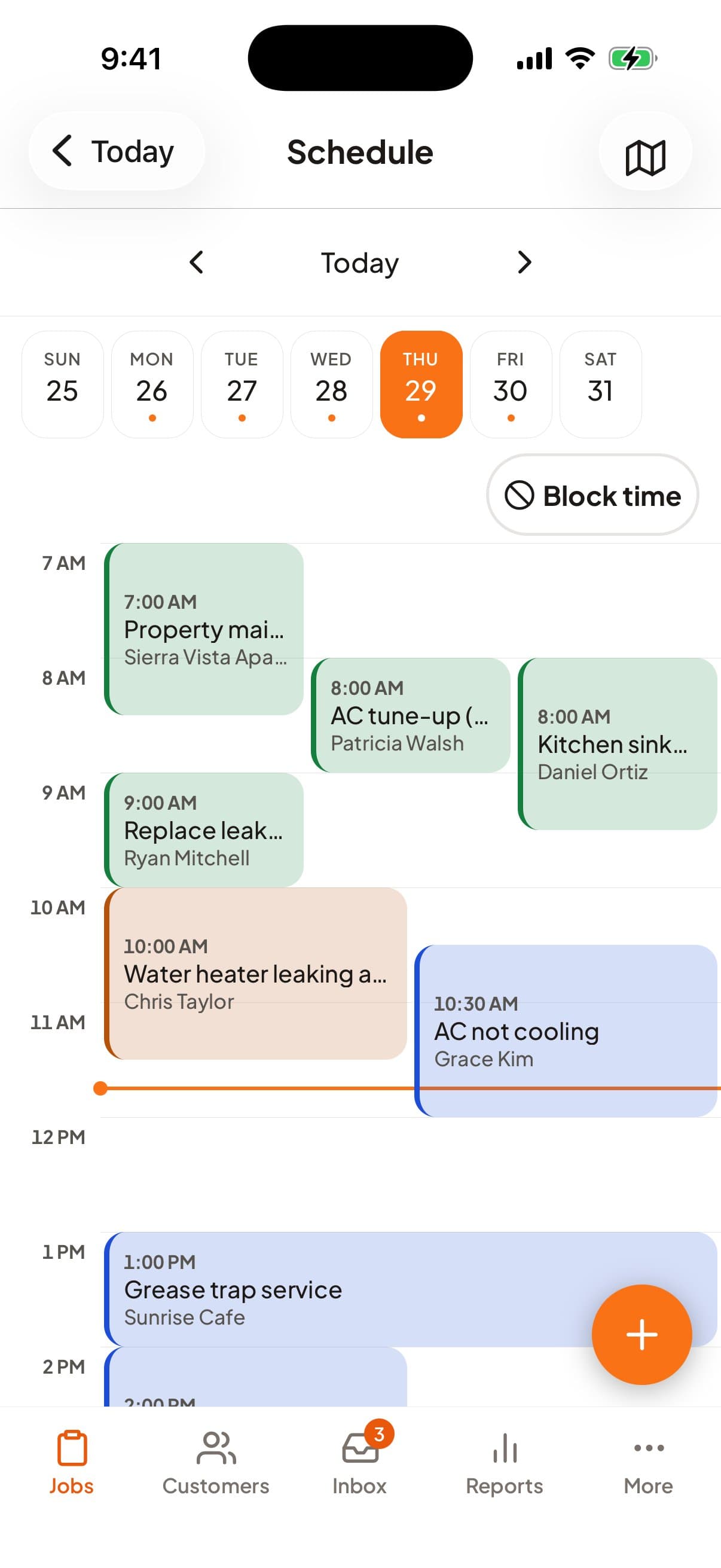
Today's jobs by hour, colored by status.
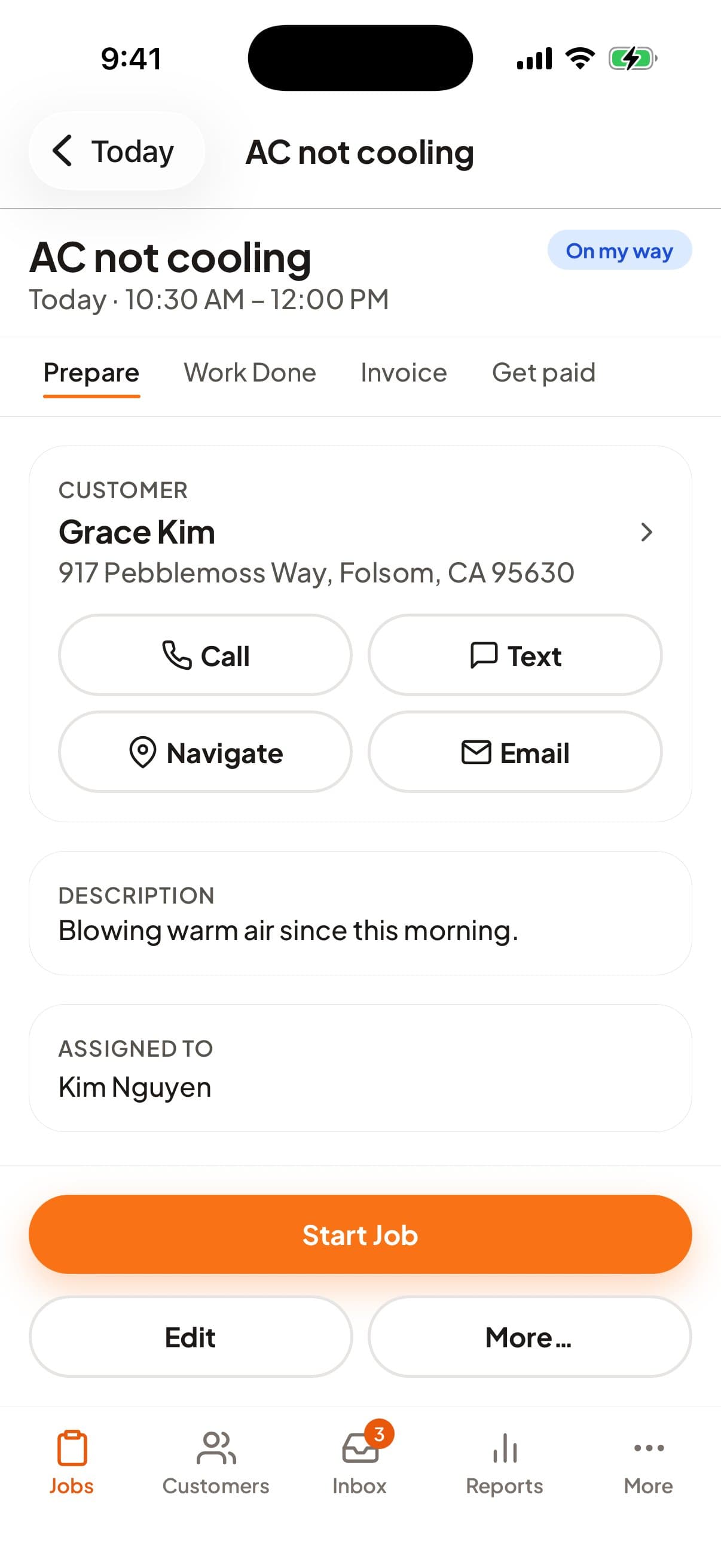
The job, the customer and one tap to call, text or email.
THE FULL DEMO · 10 MINUTES
Watch a demo
Follow one shop through a day in the app: a quote approved and signed, the job scheduled and done, and the invoice paid.
No card needed to start.
QUESTIONS
Straight answers.
Can HVAC scheduling software handle recurring maintenance plans?
Yes. Set the cadence once and Handro creates each future tune-up visit automatically, without anyone re-typing the booking.
Does everyone on my crew need their own subscription?
No. Team is US$49 a month flat for up to 10 people, with every feature on every paid plan, so adding a tech never adds a seat fee.
Can a tech see the day's schedule from their phone?
Yes. The Today view is the mobile app's home screen, built for a tech checking the day between jobs.
Is there a setup fee to move our schedule into Handro?
No setup fee, and Starter is free. Start free, add your jobs and customers, and you're scheduling from day one.
Does HVAC scheduling software need to connect to QuickBooks?
It doesn't have to, but on Solo and Team, Handro syncs invoices and payments to QuickBooks Online if you already keep your books there.
How often should HVAC maintenance visits be scheduled?
Most shops book two visits a year, one before cooling season and one before heating season. See our guide How to Build an HVAC Maintenance Schedule That Keeps Revenue Coming for the details.